
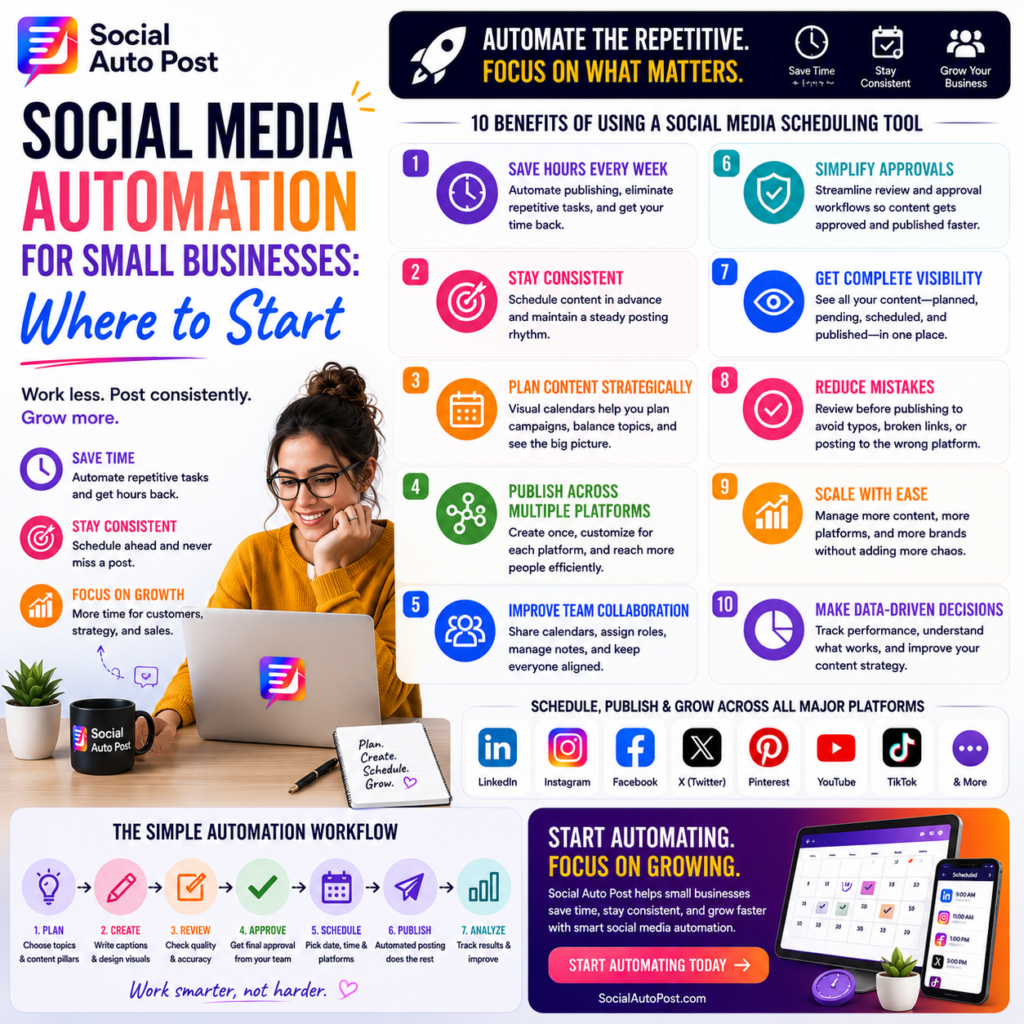
Social Media Automation for Small Businesses: Where to Start
Running a small business means wearing a lot of hats.
One minute you’re talking to customers. The next you’re managing invoices, solving operational problems, checking inventory, working with employees, or trying to generate new sales.
Then you remember:
You haven’t posted anything on social media this week.
For many small businesses, social media isn’t difficult because they don’t understand its value. It’s difficult because consistent marketing requires time—and time is often the resource they have the least of.
That’s where social media automation for small business can help.
Automation doesn’t mean replacing authentic communication with robotic posts. It means using technology to handle repetitive marketing tasks so you can maintain a consistent presence without managing every post manually.
And you don’t need a complicated enterprise system to get started.
What Is Social Media Automation?
Social media automation uses software to simplify repetitive tasks involved in managing social channels.
This can include:
- Scheduling posts
- Publishing automatically
- Organizing content calendars
- Repurposing content
- Managing approvals
- Coordinating multiple platforms
- Assisting with captions
- Tracking performance
Instead of manually opening each social network whenever something needs to be published, you can prepare content ahead of time and let your system handle much of the repetitive execution.
The objective is simple:
Spend less time managing social media and more time running your business.
Why Automation Matters for Small Businesses
Large companies may have entire marketing departments.
Small businesses often don’t.
Social media could be managed by:
- The owner
- One marketing employee
- A freelancer
- An agency
- Someone doing marketing alongside another job
That makes efficiency especially important.
A good automation workflow helps a small team do more without needing to hire someone simply to keep up with daily publishing.
Start With the Tasks That Waste the Most Time
Don’t try to automate everything immediately.
Begin by identifying repetitive tasks.
For one week, pay attention to how much time you spend:
- Logging into platforms
- Copying captions
- Uploading graphics
- Looking for content ideas
- Finding files
- Checking publishing times
- Updating spreadsheets
- Creating similar posts repeatedly
These are usually the best automation opportunities.
Your first goal shouldn’t be:
“Automate our entire marketing department.”
It should be:
“Remove the repetitive tasks that don’t need to be done manually.”
Step 1: Choose Your Most Important Platforms
A common small-business mistake is trying to be everywhere.
You don’t necessarily need five active social networks.
Instead, ask:
- Where are our customers?
- Which platform generates inquiries?
- Where does our content perform well?
- Which channels can we realistically maintain?
For example, a B2B business might prioritize LinkedIn.
A visually driven local brand might focus on Instagram and Facebook.
Starting with two or three relevant platforms is often better than maintaining five inactive accounts.
Step 2: Define 3–5 Content Pillars
Automation becomes easier when you know what you’re going to talk about.
Content pillars are recurring themes your business consistently publishes around.
A small service business might use:
Educational
Tips and helpful advice.
Product or Service
Explain what you offer and how it helps.
Customer Success
Testimonials, reviews, and results.
Behind the Scenes
Introduce your team and show how the business operates.
Industry Insights
Discuss trends and useful developments.
Now content creation becomes structured.
Instead of asking, “What should I post?” you choose the next topic within an established pillar.
Step 3: Create a Simple Content Calendar
You don’t need to plan 365 posts.
Start small.
Plan the next two to four weeks.
Your calendar could look like:
| Day | Content |
|---|---|
| Monday | Educational tip |
| Wednesday | Product/service post |
| Friday | Customer story |
| Sunday | Behind-the-scenes post |
This immediately removes much of the daily decision-making.
You know what’s coming before the day arrives.
Step 4: Batch Your Content
One of the easiest ways to save time is content batching.
Instead of creating one post every morning, set aside a focused block of time.
For example:
First 30 minutes: Choose topics.
Next hour: Write captions.
Next hour: Prepare graphics.
Final 30 minutes: Review and schedule.
In a single afternoon, you may be able to prepare several weeks of content.
Automation then distributes those posts according to your calendar.
Step 5: Schedule Posts in Advance
Scheduling is one of the first tasks almost every small business should automate.
Once a post is approved, choose:
- Platform
- Date
- Time
and schedule it.
The post can then publish without someone stopping their work to manually upload it.
This is especially useful during:
- Busy periods
- Weekends
- Holidays
- Vacations
- Product launches
Your social presence can remain consistent even when you’re focused elsewhere.
Step 6: Centralize Multi-Platform Publishing
Managing platforms separately creates unnecessary work.
If you’re publishing on LinkedIn, Instagram, Facebook, and X, logging into each network repeatedly becomes inefficient.
A centralized workflow makes it easier to prepare and coordinate content across several channels.
But don’t simply copy and paste identical posts everywhere.
Adapt the core message.
For example:
LinkedIn: More professional and detailed.
Instagram: Visual and concise.
Facebook: Conversational and community-focused.
X: Short and direct.
Automation handles distribution.
You still control how the brand communicates.
Step 7: Use AI as an Assistant
AI can be particularly useful for small businesses that don’t have dedicated copywriters.
Use AI to help:
- Brainstorm ideas
- Draft captions
- Generate hooks
- Rewrite posts
- Create CTA variations
- Repurpose blogs
- Adapt posts for different platforms
But don’t automatically publish every AI-generated draft.
Review it first.
Add your experience, personality, examples, and brand language.
A useful workflow is:
Idea → AI Draft → Human Edit → Schedule
That combination provides speed without sacrificing authenticity.
Step 8: Repurpose What You Already Have
Small businesses often have more content than they realize.
You may already have:
- Blog posts
- Customer questions
- Reviews
- Product pages
- Emails
- Videos
- Presentations
- Case studies
Turn them into social content.
One blog could become:
- Three educational posts
- One carousel
- One short video
- Several quotes
- An email
- An infographic
You don’t always need another idea.
Sometimes you simply need to extract more value from an idea you’ve already created.
Step 9: Automate Approvals When Necessary
If you’re a one-person business, this may not matter yet.
But once multiple people are involved, approvals can quickly become messy.
Use clear statuses:
Draft → Review → Approved → Scheduled → Published
Everyone knows what happens next.
This is especially helpful when working with:
- Freelancers
- Agencies
- Designers
- Business partners
- Marketing assistants
It reduces endless messages asking whether a post is ready.
Step 10: Keep Engagement Human
This is one area where small businesses should be careful with automation.
You can automate publishing.
You shouldn’t automate every relationship.
Continue personally reviewing:
- Comments
- Customer questions
- Complaints
- Direct messages
- Important mentions
Small businesses often have an advantage over large corporations because customers can interact with real people.
Don’t automate that advantage away.
Step 11: Track a Few Metrics That Matter
You don’t need a dashboard containing 50 metrics.
Start with the numbers connected to your goals.
Track:
- Reach
- Engagement
- Website clicks
- Leads
- Inquiries
- Conversions
If one content type consistently generates inquiries, create more of it.
If another gets likes but never produces meaningful action, reconsider its role.
Automation should help you improve—not simply publish more.
A Simple Small-Business Automation Workflow
Your entire system can begin with seven steps:
1. Plan
Choose your topics.
2. Create
Batch your captions and visuals.
3. Customize
Adapt content for each platform.
4. Review
Check quality and accuracy.
5. Schedule
Plan posts ahead of time.
6. Engage
Respond personally after publication.
7. Analyze
Identify what actually works.
Then repeat.
That’s enough to build a strong foundation.
What Not to Automate
Automation is most useful for predictable, repetitive tasks.
Keep humans involved in:
- Brand strategy
- Creative judgment
- Customer relationships
- Sensitive messages
- Crisis communication
- Final quality checks
Think of automation as an assistant.
It handles the routine work so you can concentrate on decisions that require experience and judgment.
How Social Auto Post Helps Small Businesses
Social Auto Post is designed to make social media management more manageable for businesses that don’t have unlimited marketing resources.
With one centralized workflow, teams can manage:
- AI-assisted content creation
- Content calendar planning
- Multi-platform scheduling
- Automated publishing
- Approval workflows
- Team collaboration
- Analytics and reporting
Instead of spending valuable hours switching between platforms and performing repetitive publishing tasks, small businesses can create a structured system that keeps marketing moving.
The goal isn’t to automate everything.
It’s to automate the right things.
Final Thoughts
Small businesses don’t need to choose between running the company and maintaining a consistent social presence.
The right automation strategy makes both more manageable.
Start with the basics:
Choose your platforms.
Define your content pillars.
Plan ahead.
Batch your content.
Schedule your posts.
Repurpose what works.
Keep conversations human.
You don’t need to transform your entire workflow overnight.
Automate one repetitive task.
Then another.
Over time, those small improvements can return hours to your week while helping your business stay visible, consistent, and connected to its audience.
Frequently Asked Questions
What is social media automation for small business?
Social media automation for small business uses software to streamline repetitive marketing tasks such as content scheduling, publishing, planning, approvals, and performance tracking.
What should a small business automate first?
Scheduling and publishing are usually good starting points. They are repetitive, time-consuming, and can often be automated without sacrificing the personality of your content.
Can AI create social media content for a small business?
AI can help generate ideas, captions, hooks, and content variations. Businesses should still review AI-generated content for accuracy, brand voice, and authenticity before publishing.
Will automation make my business sound robotic?
Not if you use it strategically. Automate repetitive processes while keeping human control over your messaging, storytelling, customer interactions, and final content review.
How often should a small business post?
There is no universal frequency. A sustainable schedule of high-quality content is generally more valuable than publishing frequently for a short period and then stopping.
CTA: Start Automating
You don’t need a large marketing team to build a consistent social media presence.
With Social Auto Post, you can plan content, use AI to accelerate creation, schedule across multiple platforms, automate publishing, and track performance through a more centralized workflow.
Start automating. Save valuable time. Give your small business more room to grow.