
Social Media Reporting for Executives: What Actually Matters
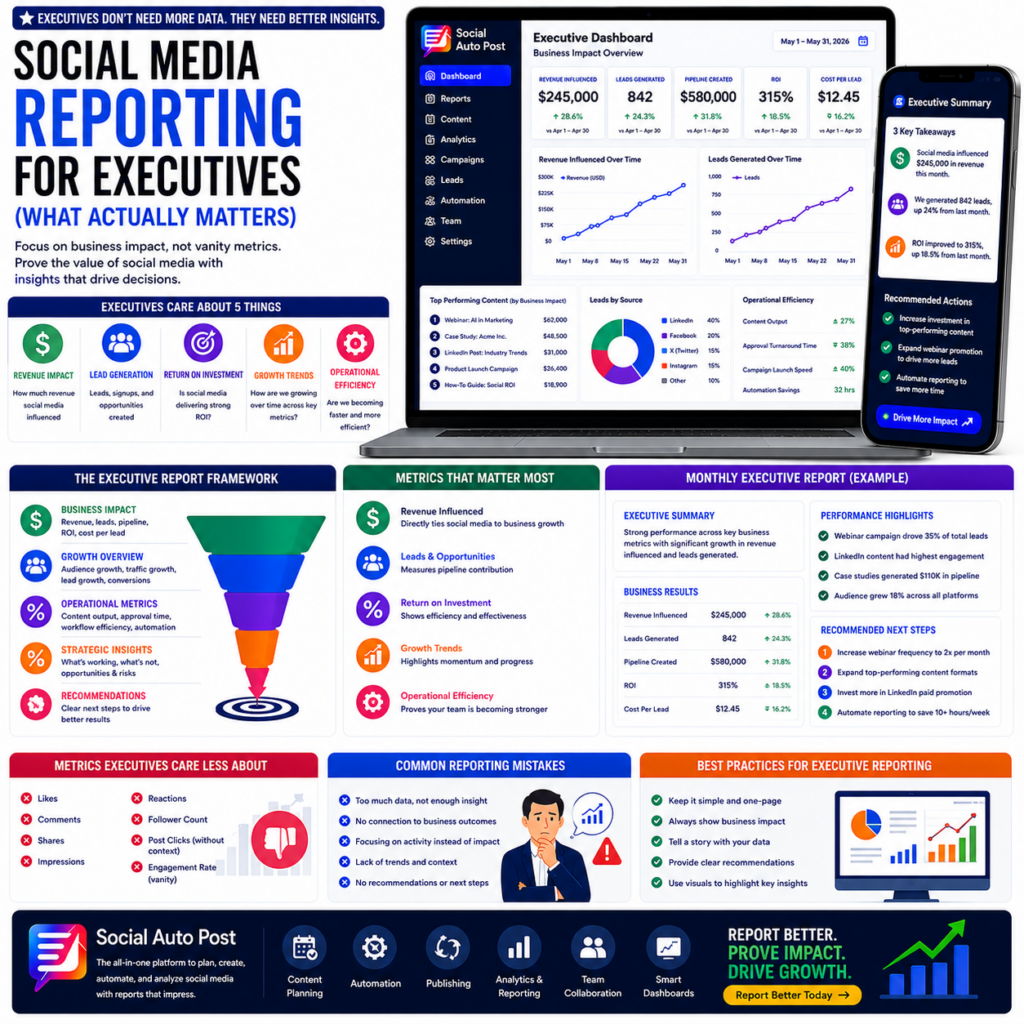
Social media reporting for executives should explain how social media helps a company grow. A useful report does more than show likes, shares, and follower numbers. Instead, it connects social media work with business results such as sales, leads, customers, and revenue.
Many marketing teams spend a lot of time creating reports. However, some reports include too many numbers and fail to explain what those numbers mean.
Common report details include:
- Likes
- Shares
- Impressions
- Comments
- Followers
- Reach
These numbers can show audience activity. However, they do not always show how social media helps the business.
Therefore, a strong report should answer one important question:
“How is social media helping the company?”
The purpose is not only to show activity. Instead, the goal is to explain results and guide future actions.
Why Social Media Reporting for Executives Needs a Simple Approach
Many reports become difficult because they contain too much information.
For example, teams may add many charts, tables, and data points. As a result, leaders may spend more time finding answers instead of making decisions.
Most executives want answers to four simple questions:
What Is Working?
What Needs Improvement?
What Results Did We Create?
What Should We Do Next?
Because of this, every report should focus on useful information.
Building a Better Social Media Reporting for Executives Process
Marketing teams and company leaders often look at performance in different ways.
Marketing teams usually review:
- Engagement
- Reach
- Followers
- Content results
Meanwhile, executives usually care about:
- Revenue
- Growth
- Costs
- Business results
Therefore, reports should connect social media activity with company goals.
This connection makes reports easier to understand and more valuable.
Five Metrics That Matter in Social Media Reporting for Executives
1. Revenue Impact
Revenue is one of the most important areas in a report.
Executives want to know if social media helps create business growth.
For example, teams can measure:
- Revenue created
- New customers
- Sales opportunities
- Business value
In addition, these numbers help show why social media investment matters.
2. Lead Generation
Social media can help companies find potential customers.
Because of this, teams should track:
- New leads
- Demo requests
- Trial signups
- Contact requests
- Email subscribers
Also, lead data helps explain how content supports future sales.
3. Return on Investment (ROI)
Companies need to understand if their spending creates good results.
Important numbers include:
- Campaign ROI
- Cost per lead
- Cost per customer
- Advertising results
Therefore, ROI helps leaders decide where to invest money next.
4. Growth Over Time
One month of results does not show the full picture.
Instead, companies should review progress over longer periods.
Useful areas include:
- Audience growth
- Website traffic
- Lead growth
- Customer growth
- Sales growth
Furthermore, trends help teams understand what strategies work best.
5. Team Performance
A good report can also show how the team works.
For example, leaders may ask:
- Are tasks completed faster?
- Is automation saving time?
- Is the team creating more content?
Teams can measure:
- Content output
- Approval speed
- Campaign time
- Hours saved
As a result, these numbers show where improvements are happening.
Metrics That Should Not Control the Report
Some social media numbers are still useful.
However, they should support the main message instead of becoming the focus.
Examples include:
❌ Likes
❌ Reactions
❌ Comments
❌ Shares
❌ Impressions
❌ Follower numbers
These metrics show activity. Still, they do not always explain business results.
Therefore, include them only when they provide helpful information.
Social Media Reporting for Executives Dashboard Layout
A simple dashboard helps leaders review results quickly.
It should include:
Business Results
- Revenue
- Leads
- Customers
- ROI
Growth Results
- Audience growth
- Website visits
- Sales growth
- Customer growth
Team Results
- Content created
- Time saved
- Faster processes
Future Actions
Include:
- What worked well
- What needs change
- What should happen next
Because of this structure, leaders can understand performance faster.
Why Reports Need More Than Numbers
Numbers alone do not tell the complete story.
Executives also need a simple explanation.
For example:
Instead of:
“Engagement increased by 20%.”
Write:
“Engagement increased by 20% because helpful content attracted more customers.”
This version explains the reason behind the result.
Therefore, every report should explain:
- What happened
- Why it happened
- What comes next
Monthly Social Media Reporting for Executives Template
A monthly report can include:
Summary
Share the biggest updates first.
For example:
- Leads increased by 25%
- Social media supported new sales
- Automation saved team time
Business Results
Include:
- Revenue
- Leads
- Customers
- ROI
Main Insights
Explain:
- Best content
- New opportunities
- Areas to improve
Next Steps
Suggest actions such as:
- Create more useful content
- Improve tracking
- Automate repeated tasks
Reports Should Match Business Goals
Every company has different goals.
Therefore, reports should focus on what matters most.
Companies Focused on Growth
Track:
- Leads
- Customers
- Revenue
Companies Focused on Branding
Track:
- Awareness
- Audience growth
- Brand visibility
Companies Focused on Saving Time
Track:
- Automation
- Faster workflows
- Time savings
In this way, reports become more useful for every team.
Common Social Media Reporting Mistakes
Too Much Data
Too many numbers can make reports confusing.
Missing Business Results
Metrics need clear meaning.
No Action Plan
Reports should explain what happens next.
Only Tracking Activity
More posts do not always create better results.
Ignoring Long-Term Changes
Trends usually provide better information than single results.
How Automation Helps Social Media Reporting
Manual reports can take many hours.
However, automation tools can help teams:
- Collect information
- Create reports
- Track changes
- Find trends
- Save time
As a result, marketers can spend more time improving campaigns.
The Future of Social Media Reporting for Executives
Social media reporting will continue to improve.
In the future, companies will use:
Better Data
Reports will focus on useful business information.
Faster Updates
Dashboards will update with less manual work.
Smarter Tools
Technology will help teams find important changes.
Clear Actions
Reports will help leaders make better choices.
Overall, reporting will become a bigger part of business decisions.
Example Executive Scorecard
A simple scorecard may include:
- Revenue Influenced: $245,000
- Leads Generated: 842
- Pipeline Created: $580,000
- ROI: 315%
- Audience Growth: +18%
- Content Output: +27%
This format gives leaders a quick view of performance.
Final Thoughts
Social media reporting for executives should focus on business results, not only activity.
Leaders want clear answers and useful information.
They also want to understand how social media supports company goals.
When reports focus on value, teams can improve their work and show stronger results.
Ultimately, better reporting helps companies make smarter decisions.
Report Better
Stop creating reports full of numbers that leadership ignores.
👉 Report better and prove the value of your social media efforts today.