
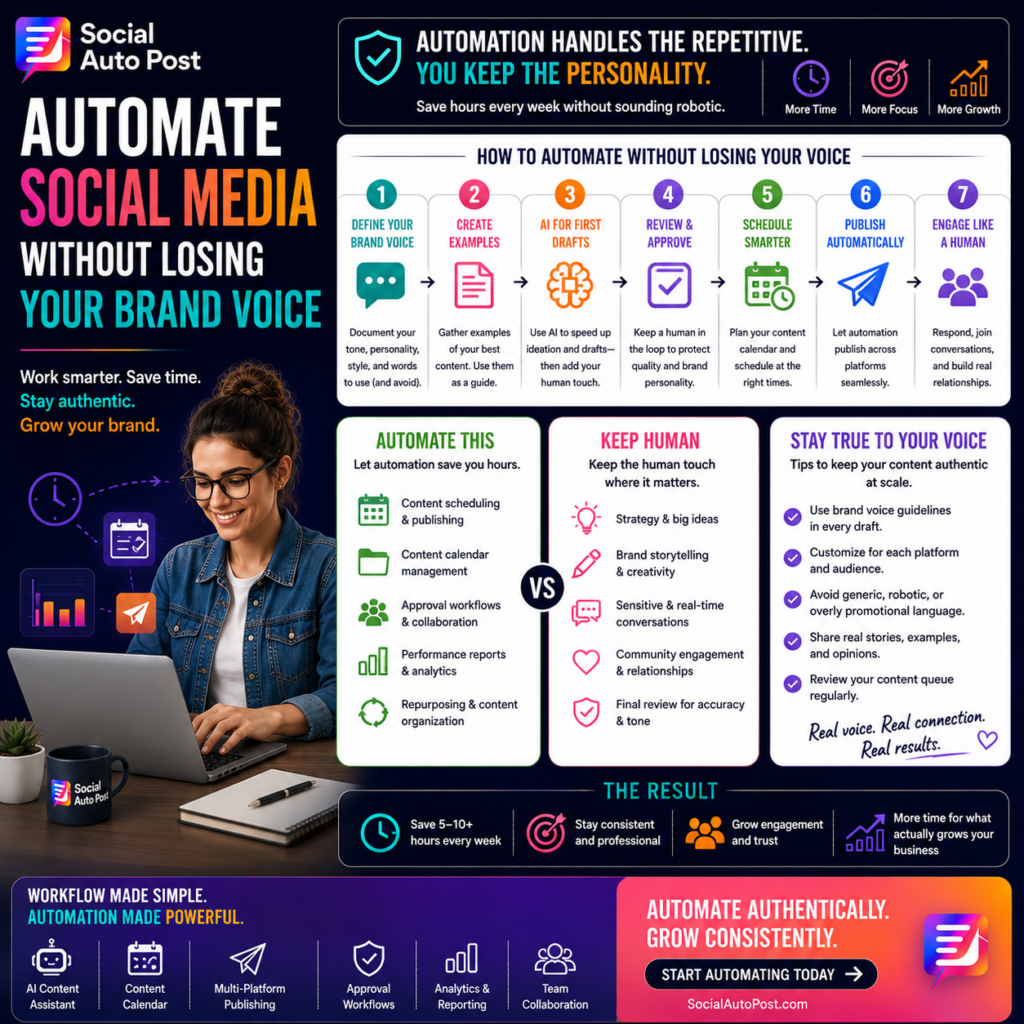
How to Automate Social Media Without Losing Your Brand Voice
Social media automation creates an interesting challenge.
Businesses want to publish more consistently, manage multiple platforms efficiently, and reduce the hours spent on repetitive tasks.
But they don’t want their content to sound like it came from a machine.
That’s an important distinction.
The purpose of automation isn’t to remove your brand’s personality. It’s to automate the repetitive work surrounding content so your team has more time to focus on the ideas, conversations, and creative decisions that actually make your brand unique.
When businesses learn how to automate social media posts strategically, efficiency and authenticity can work together.
Here’s how.
Why Brand Voice Matters
Your brand voice is the recognizable personality behind your communication.
It influences:
- Word choice
- Sentence structure
- Humor
- Formality
- Personality
- Emotional tone
- Calls-to-action
- How you interact with customers
Two companies can communicate the same information and sound completely different.
One might say:
“Discover our latest productivity features.”
Another might say:
“Less busywork. More time to actually get things done.”
The information is similar.
The personality isn’t.
That personality helps audiences recognize and remember your brand.
The Problem Isn’t Automation—It’s Generic Automation
Automation sometimes gets blamed for robotic content.
But automation itself isn’t usually the problem.
The problem is automating content without giving the system enough information about your brand.
If an AI tool receives a generic instruction such as:
“Write a post about social media marketing.”
the result will probably sound generic.
Instead, provide context about:
- Your audience
- Brand personality
- Preferred terminology
- Writing style
- Content objective
- Platform
- Words to avoid
- CTA style
Better inputs produce more recognizable outputs.
Step 1: Document Your Brand Voice
Before automating anything, define how your business should sound.
Create simple brand voice guidelines covering areas such as:
Personality
Are you:
- Professional?
- Friendly?
- Bold?
- Playful?
- Educational?
- Technical?
- Conversational?
Sentence Style
Do you prefer short, punchy sentences or detailed explanations?
Vocabulary
Which phrases does your brand regularly use?
Which words should never appear?
Humor
Is humor appropriate?
If so, what kind?
Calls-to-Action
Does your brand say:
“Book a demo.”
Or:
“See how it works.”
Small details create a recognizable voice.
Step 2: Build Examples of Great Content
Rules help.
Examples are even better.
Collect posts that accurately represent your brand.
Include examples of:
- Educational posts
- Promotional posts
- Product announcements
- Thought leadership
- Customer stories
- CTAs
- Replies
These examples give your team a practical reference point when reviewing automated content.
You can also use approved examples as guidance when creating AI-assisted drafts.
Step 3: Automate the Workflow, Not the Personality
The safest place to begin automation is with operational tasks.
Automate things like:
- Scheduling
- Publishing
- Content calendars
- Approval routing
- Campaign organization
- Reporting
- Performance tracking
These activities consume time but don’t require your brand personality.
For example, automatically publishing an already approved caption at 10:00 AM doesn’t make that caption less authentic.
The creative decision happened before automation took over.
Step 4: Use AI for First Drafts
AI can dramatically speed up content creation.
But treating the first output as the final post is risky.
A better workflow is:
Idea → AI Draft → Human Edit → Approval → Schedule
AI can help generate:
- Hooks
- Caption drafts
- Headline options
- CTA variations
- Shorter versions
- Platform-specific adaptations
Then a marketer adds the final layer of personality, context, and judgment.
AI creates momentum.
Humans create distinction.
Step 5: Create Reusable Content Templates
Templates help maintain consistency without making every post identical.
For example, an educational post could follow:
Hook
Identify a problem.
Insight
Explain why it matters.
Solution
Provide practical advice.
CTA
Invite the next action.
The structure stays consistent while the actual message changes.
Businesses can create separate templates for:
- Educational content
- Product launches
- Customer success
- Thought leadership
- Announcements
- Promotions
This creates efficiency while protecting brand consistency.
Step 6: Customize Content for Each Platform
Automation should not mean blindly copying the same caption across every network.
Your brand voice can remain consistent while the format changes.
Your voice may be more professional and insight-driven.
It might become more visual, concise, and conversational.
The same brand could emphasize community and discussion.
X
Messaging may become shorter and more immediate.
Think of it as the same person communicating in different environments.
The personality stays recognizable.
The presentation changes.
Step 7: Keep Human Approval in the Workflow
For most businesses, automated content should still have a quality-control stage.
Before publishing, review:
- Does this sound like us?
- Is the information accurate?
- Is the tone appropriate?
- Does the CTA make sense?
- Is the post useful?
- Could someone misunderstand it?
Approval workflows are especially important for:
- Promotions
- Sensitive announcements
- Customer communications
- Industry commentary
- Major campaigns
Automation increases speed.
Review protects quality.
Step 8: Don’t Automate Every Conversation
Publishing can be automated effectively.
Relationships are different.
Be careful with automatically generated:
- Customer replies
- Complaint responses
- Sensitive messages
- Community conversations
People notice when they’re receiving canned responses.
Social media is still social.
Use automation to create more time for genuine interaction rather than trying to automate every interaction itself.
Step 9: Build a Content Library
A library of approved content makes automation safer and faster.
Organize reusable assets such as:
- Evergreen posts
- Brand graphics
- Testimonials
- Product descriptions
- Educational resources
- Approved CTAs
- Campaign templates
Teams can then repurpose proven material instead of creating everything from scratch.
This also reduces the risk of inconsistent messaging.
Step 10: Review Your Automated Queue
Automation shouldn’t become “schedule and forget.”
Review upcoming content regularly.
Check whether:
- Information is still accurate
- Campaigns are still active
- Offers haven’t changed
- Scheduled posts remain contextually appropriate
- Links still work
Something written three weeks ago might no longer make sense today.
A quick queue review helps prevent avoidable mistakes.
Step 11: Measure Whether Your Voice Is Working
Brand voice isn’t only a creative consideration.
You can also measure audience response.
Monitor:
- Comments
- Shares
- Saves
- Click-through rates
- Engagement rate
- Audience sentiment
- Conversions
Compare different messaging styles.
Perhaps direct educational posts consistently outperform promotional language.
Maybe conversational captions generate more comments.
Use performance data to improve your voice without sacrificing authenticity.
Signs Your Automation Sounds Too Robotic
Watch for warning signs such as:
- Every post follows exactly the same structure
- Captions use repetitive phrases
- Excessive buzzwords appear frequently
- Posts lack specific examples
- Every CTA sounds identical
- Content could belong to any competitor
- Audience comments receive generic responses
Your content should sound systematic without sounding manufactured.
A Better Automation Workflow
A practical workflow might look like this:
1. Strategy
Define the goal and topic.
2. Creation
Use human expertise and AI assistance to create the draft.
3. Brand Review
Check voice, accuracy, and relevance.
4. Approval
Confirm the final version.
5. Scheduling
Choose the appropriate platform and time.
6. Automated Publishing
Let the system handle distribution.
7. Human Engagement
Respond to conversations and community activity.
8. Analytics
Measure performance and improve future content.
This balance gives businesses efficiency without sacrificing personality.
How Social Auto Post Supports Authentic Automation
Social Auto Post helps businesses automate repetitive parts of social media management while keeping people involved where their judgment matters most.
Teams can organize:
- AI-assisted content creation
- Content calendars
- Multi-platform publishing
- Approval workflows
- Team collaboration
- Scheduling
- Analytics and reporting
The goal isn’t to turn your social presence into autopilot.
It’s to create a smarter system where automation handles repetitive execution and your team remains responsible for strategy, creativity, and relationships.
Final Thoughts
Businesses shouldn’t have to choose between efficiency and authenticity.
You can have both.
The key is understanding what to automate and what to keep human.
Automate:
- Scheduling
- Publishing
- Organization
- Approvals
- Routine reporting
Keep human oversight around:
- Strategy
- Storytelling
- Brand personality
- Sensitive communication
- Community engagement
The best automation doesn’t make your brand sound like a robot.
It gives your team more time to sound like your brand.
Frequently Asked Questions
Can you automate social media posts without making them sound robotic?
Yes. Automate repetitive tasks such as scheduling and publishing while maintaining human review for messaging, brand voice, context, and quality.
Should AI write all of my social media content?
AI is most effective as an assistant. It can accelerate brainstorming and drafting, but human editing helps ensure the final content reflects your expertise, personality, and brand standards.
What social media tasks are safest to automate?
Scheduling, publishing, content organization, approval routing, calendar management, and routine reporting are strong candidates for automation.
How do you maintain brand voice when using AI?
Document your brand guidelines, provide examples of approved content, use detailed prompts, create reusable templates, and maintain a human review process before publication.
CTA: Automate Authentically
Save time without sacrificing what makes your brand recognizable.
With Social Auto Post, you can streamline content creation, approvals, scheduling, multi-platform publishing, and analytics while keeping your team in control of the voice behind every post.
Automate authentically. Stay recognizable. Grow without sounding robotic.