
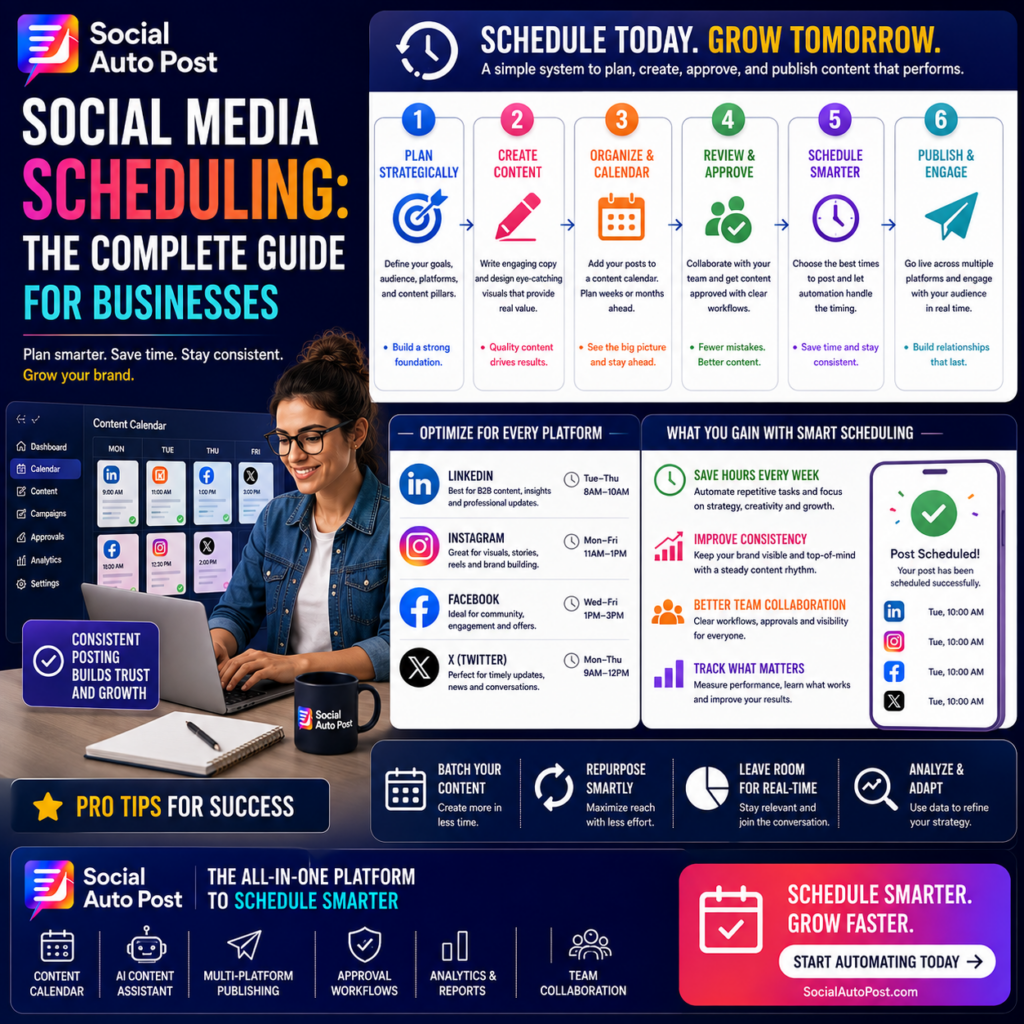
Social Media Scheduling: The Complete Guide for Businesses
Category: Scheduling
Target Length: ~1,500 words
Primary Keyword: social media scheduling
Secondary Keywords: social media scheduler, schedule social media posts, social media content calendar, social media planning, automated social media posting, social media management
SEO Title: Social Media Scheduling: The Complete Guide for Businesses (2026)
Meta Title: Social Media Scheduling: Complete Business Guide | Social Auto Post
Meta Description: Learn how social media scheduling helps businesses plan, review, approve, and publish content efficiently. Build a smarter scheduling workflow that saves time and improves consistency.
Social Media Scheduling: The Complete Guide for Businesses
Managing social media becomes complicated surprisingly quickly.
One platform turns into three. One weekly post becomes daily publishing. A single marketer becomes a team of writers, designers, managers, and approvers.
Before long, businesses are juggling captions, creative assets, deadlines, approvals, campaigns, and publishing times across multiple channels.
Trying to manage everything manually creates unnecessary work.
That’s why social media scheduling has become an essential part of modern content operations.
A structured scheduling system allows businesses to plan ahead, maintain consistency, coordinate teams, and publish at the right time without organizing every workday around a posting schedule.
Here’s how to build one.
What Is Social Media Scheduling?
Social media scheduling is the process of preparing content in advance and assigning a future date and time for publication.
Instead of manually opening a platform whenever a post needs to go live, marketers prepare content ahead of time and use scheduling software to handle publication.
A typical scheduled post includes:
- Caption
- Creative asset
- Destination platform
- Link
- Publishing date
- Publishing time
- Campaign information
- Approval status
Once everything is ready, the system publishes the content according to the schedule.
But effective scheduling is about much more than simply choosing a date.
The best systems connect planning, creation, review, approval, publishing, and analytics into one workflow.
Why Businesses Should Schedule Social Media Content
Scheduling creates several important advantages.
Save Time
Manual publishing repeatedly interrupts the workday.
Preparing posts in batches and scheduling them together reduces repetitive tasks and context switching.
Stay Consistent
Busy weeks shouldn’t make your social accounts disappear.
Scheduled content keeps campaigns moving even when your team is focused elsewhere.
Plan Better Campaigns
Seeing upcoming posts on a calendar makes it easier to coordinate launches, promotions, educational content, and seasonal campaigns.
Improve Collaboration
Everyone can see what’s planned, what’s awaiting approval, and what’s ready to publish.
Reduce Last-Minute Mistakes
Planning provides time to review copy, visuals, links, and CTAs before content reaches the public.
Step 1: Define Your Social Media Goals
Don’t start by filling calendar slots.
Start with strategy.
Determine what your social media activity should accomplish.
Goals could include:
- Building brand awareness
- Educating customers
- Increasing website traffic
- Generating leads
- Growing a community
- Supporting product launches
- Driving conversions
Your goals influence what you publish and how often you publish it.
A company focused on thought leadership will need a different schedule from an ecommerce brand running frequent product campaigns.
Step 2: Choose the Right Platforms
Being active everywhere isn’t always necessary.
Identify where your target audience spends time and where your business can consistently produce relevant content.
For example:
Useful for B2B education, professional insights, company news, and thought leadership.
Strong for visual storytelling, carousels, short videos, products, and brand building.
Useful for community engagement, updates, educational content, and broader consumer audiences.
X
Useful for timely commentary, short insights, conversations, and industry developments.
Your schedule should reflect each platform’s role rather than treating every network identically.
Step 3: Establish Content Pillars
Content pillars are recurring themes that organize your strategy.
A software business might use:
- Education
- Automation
- Productivity
- Customer Success
- Industry Trends
- Product Updates
Content pillars prevent your calendar from becoming random.
Instead of asking:
“What should we post tomorrow?”
You can ask:
“Which educational topic should we cover next?”
That small shift makes planning much easier.
Step 4: Build a Social Media Content Calendar
Your content calendar becomes the central source of truth for upcoming posts.
At minimum, track:
- Publication date
- Platform
- Topic
- Content pillar
- Caption
- Creative
- CTA
- Campaign
- Status
A calendar gives teams a clear visual overview of their publishing schedule.
It also makes it easier to spot problems.
Too many promotional posts?
Not enough educational content?
Nothing scheduled for next week?
A calendar makes these gaps visible before they become urgent.
Step 5: Plan Content in Batches
Creating posts individually every day is inefficient.
Batching groups similar tasks together.
For example:
Planning session: Select topics for the next month.
Writing session: Draft several captions.
Design session: Produce the required visuals.
Review session: Check everything together.
Scheduling session: Load approved content into the calendar.
This reduces context switching and helps teams build momentum.
Instead of repeatedly moving between writing, designing, reviewing, and publishing, each task receives focused attention.
Step 6: Customize Posts for Each Platform
Scheduling shouldn’t mean copying identical content everywhere.
Different platforms have different:
- Audience expectations
- Content formats
- Character limits
- Creative requirements
- Engagement behaviors
Start with one core message, then adapt it.
A long LinkedIn insight could become:
- A shorter Facebook post
- An Instagram carousel
- A concise X post
- A short-form video script
This keeps your message consistent while respecting how people consume content on each platform.
Step 7: Create an Approval Workflow
Businesses with multiple team members need a clear review process.
A simple workflow might look like:
Idea → Draft → Design → Review → Approved → Scheduled → Published
Define who is responsible for each stage.
Writers shouldn’t need to guess whether a caption is approved.
Designers shouldn’t create graphics for abandoned ideas.
Social managers shouldn’t schedule content that still requires changes.
Clear statuses eliminate confusion.
Step 8: Run a Pre-Publish Review
Before scheduling a post, check the details.
Review:
- Spelling and grammar
- Brand voice
- Image dimensions
- Logo usage
- Links
- Mentions
- Hashtags
- CTA
- Publishing date
- Publishing time
- Platform selection
A 60-second review can prevent an embarrassing public mistake.
For important campaigns, consider having another team member perform the final check.
Step 9: Choose Posting Times Intelligently
There is no universal “best time to post” for every business.
Audience behavior differs based on:
- Location
- Industry
- Platform
- Demographics
- Work schedules
- Time zones
Start with reasonable posting windows, then use your own performance data to improve the schedule.
Track when posts generate the strongest:
- Reach
- Engagement
- Clicks
- Conversions
Your audience data should eventually guide timing decisions more than generic industry recommendations.
Step 10: Leave Space for Real-Time Content
Scheduling everything months ahead can make a brand feel disconnected from current conversations.
Keep room for:
- Industry news
- Trending topics
- Product announcements
- Customer stories
- Company updates
- Unexpected opportunities
A useful approach is to schedule the majority of your predictable content while leaving some capacity for timely posts.
Your calendar provides structure without becoming restrictive.
Step 11: Repurpose Evergreen Content
Not every scheduled post needs to be completely new.
High-value evergreen content can often be refreshed and reused.
A successful educational article might become:
- A carousel
- A short video
- A checklist
- Several text posts
- An infographic
- An email
You can also revisit older evergreen posts when the information remains accurate and useful.
Repurposing improves efficiency while extending the value of your strongest ideas.
Step 12: Review Your Scheduled Queue
Scheduling shouldn’t become “set it and forget it.”
Circumstances change.
Before scheduled content publishes, periodically review your queue.
Ask:
- Is this information still accurate?
- Is the post still appropriate?
- Has something happened that changes its context?
- Does the link still work?
- Is the offer still available?
This is especially important when posts are scheduled weeks or months ahead.
Automation should improve control—not eliminate oversight.
Step 13: Measure Performance
Publishing is not the end of the workflow.
It’s the beginning of the learning process.
Track metrics connected to your objectives, such as:
- Reach
- Engagement rate
- Saves
- Shares
- Click-through rate
- Website traffic
- Leads
- Conversions
- Revenue
Then compare performance across:
- Platforms
- Posting times
- Content pillars
- Formats
- Campaigns
Use those insights to improve the next scheduling cycle.
Common Social Media Scheduling Mistakes
Scheduling Too Far Ahead Without Reviewing
Long-term planning is useful, but outdated posts can create problems.
Review upcoming content regularly.
Publishing the Same Post Everywhere
Adapt content to each platform rather than treating distribution as simple duplication.
Ignoring Comments After Publishing
Scheduling automates publication—not community management.
Continue responding to your audience.
Filling Every Calendar Slot
More content isn’t automatically better.
Prioritize quality and strategic relevance.
Tracking Activity Instead of Results
Publishing 30 posts isn’t a business outcome.
Measure what those posts actually accomplish.
A Simple Weekly Scheduling Workflow
Businesses don’t need an overly complicated system.
A practical workflow could be:
Monday: Review performance and select upcoming topics.
Tuesday: Draft captions and content.
Wednesday: Create visuals.
Thursday: Review and approve.
Friday: Schedule the following week.
Once this process becomes routine, social media becomes significantly easier to manage.
How AI Can Improve Social Media Scheduling
AI can accelerate several parts of the process.
Teams can use AI assistance to:
- Brainstorm topics
- Draft captions
- Generate alternative hooks
- Adapt content for different platforms
- Repurpose existing material
- Create CTA variations
The important distinction is that AI supports the workflow while marketers retain strategic and editorial control.
Automation handles repetitive work.
People provide judgment.
How Social Auto Post Simplifies Scheduling
Social Auto Post helps businesses bring planning and publishing into a more centralized workflow.
Teams can manage:
- AI-assisted content creation
- Content calendars
- Multi-platform scheduling
- Team collaboration
- Approval workflows
- Automated publishing
- Analytics and reporting
Instead of jumping between spreadsheets, messages, calendars, and individual social networks, marketers can coordinate more of the publishing process from one place.
That means less time managing logistics and more time creating content that actually matters.
Final Thoughts
Effective social media scheduling isn’t simply about automating when a post goes live.
It’s about building a repeatable system.
Plan strategically.
Create efficiently.
Review carefully.
Schedule intelligently.
Engage authentically.
Measure continuously.
When these steps work together, social media becomes easier to manage, teams stay more consistent, and campaigns become less dependent on last-minute effort.
The goal isn’t to automate your relationships with customers.
It’s to automate enough of the repetitive work that your team has more time to build those relationships.
Frequently Asked Questions
What is social media scheduling?
Social media scheduling is the process of preparing posts in advance and assigning specific dates and times for them to publish automatically on selected social platforms.
How far ahead should businesses schedule social media posts?
Many businesses benefit from scheduling predictable content one to four weeks ahead while leaving room for timely updates and trends. Longer-term campaigns can be planned earlier but should be reviewed before publication.
Should businesses schedule the same content on every platform?
Not necessarily. The core idea can remain consistent, but captions, creative formats, CTAs, and messaging should be adapted to each platform and audience.
Does scheduling reduce social media engagement?
Scheduling itself doesn’t reduce engagement. Businesses should continue monitoring comments, responding to audiences, and participating in conversations after scheduled posts publish.
What should businesses look for in a social media scheduling tool?
Look for content calendar functionality, multi-platform publishing, collaboration, approvals, scheduling, analytics, and workflows that reduce unnecessary manual work.
CTA: Schedule Smarter
Stop building your social media strategy around daily reminders and manual publishing.
Schedule smarter. Stay consistent. Make every post part of a bigger strategy.